
Juniper Systems Mesa Rugged Notepad Bumper Replacement Instructions

Step-by-step guide to replace bumpers on Juniper Systems Mesa Rugged Notepad, including parts and screw details.
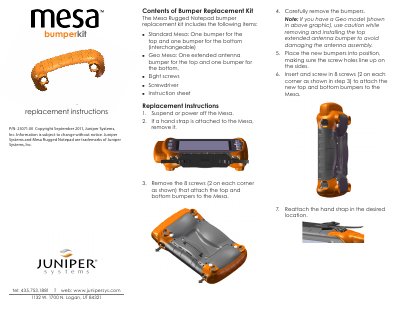

Juniper Systems Mesa Rugged Notepad Bumper Replacement Instructions - cover page
Brand
Juniper Systems
Category
Other
Document type
User Manual
Language
English
Pages
1
File format
PDF
File size
586 KB
Published
23 November, 2026
Updated
23 November, 2026
MD5 checksum
03791FE08BC3ECF4C189BA643946A051

About this manual

This document provides instructions for replacing bumpers on the Mesa Rugged Notepad. It includes parts for both standard and Geo models, with specific notes for Geo models regarding antenna protection. Steps cover removing old bumpers, installing new ones, and reattaching accessories.

What's inside

  • Contents of Bumper Replacement Kit
  • Replacement Instructions

Frequently asked questions

What should you do before removing the bumpers from the Mesa?

Suspend or power off the Mesa, and remove the hand strap if one is attached.

How many screws attach the top and bottom bumpers to the Mesa?

8 screws, with 2 on each corner.

What caution applies to the Geo model when replacing the top bumper?

Use caution while removing and installing the top extended antenna bumper to avoid damaging the antenna assembly.

Download PDF (586 KB)

More Juniper Systems Manuals


View all Juniper Systems manuals →