
Quick start guide for the Juniper Systems Archer 2 covering battery installation, AC charging, initial power-on, time setup, and battery charging.
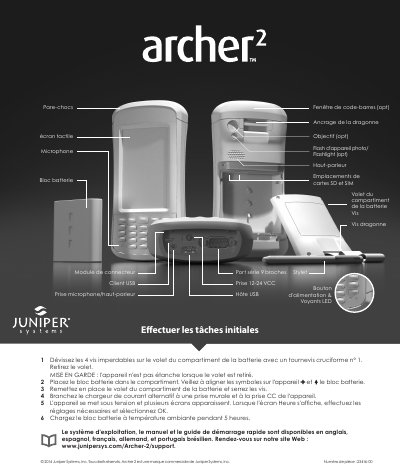
This document provides step-by-step instructions for the initial setup of the Juniper Systems Archer 2. It details how to install the battery pack, connect the AC charger, power on the device, set the time, and charge the battery for five hours at room temperature.
The operating system, manual, and quick start guide are available in English, Spanish, French, German, and Brazilian Portuguese. Users are directed to the Juniper Systems support website at www.junipersys.com/Archer-2/support for further resources. This manual is written in French.
| Battery charging time | 5 hours at room temperature |
|---|---|
| Supported languages | English, Spanish, French, German, Brazilian Portuguese |
| Power input | 12-24 VDC |
Charge the battery pack at room temperature for 5 hours.
They are available in English, Spanish, French, German, and Brazilian Portuguese on the Juniper Systems support website.