
Quick start guide for the Juniper Systems Ultra-Rugged Field PC covering battery installation, charging, device parts, and initial setup.
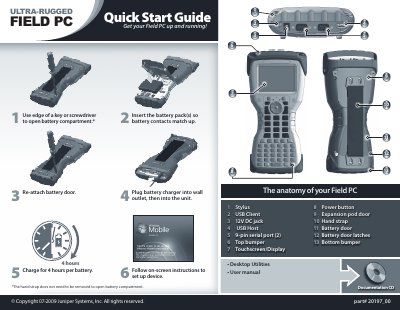
This one-page quick start guide explains how to install the battery pack(s), charge the unit, and follow on-screen setup instructions for the Juniper Systems Ultra-Rugged Field PC.
It also labels the device's parts, including the stylus, ports, touchscreen/display, power button, expansion pod door, hand strap, battery door, and bumpers. Documentation is provided on the included Documentation CD.
| Battery charging time | 4 hours per battery |
|---|
Charge for 4 hours per battery.
The hand strap does not need to be removed to open the battery compartment.
Follow on-screen instructions to set up the device.