
This document introduces the basic connection and usage methods of DVP 5986K DVD player, including connecting to the TV, searching for the correct viewing channel, setting language options, and starting playback.
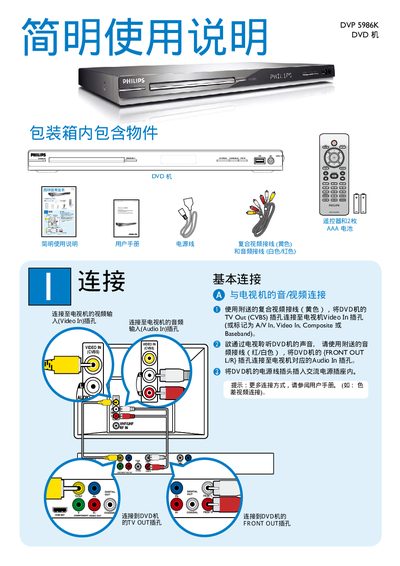
This manual describes how to connect the DVP 5986K DVD player to TV and audio equipment using its digital, coaxial, component video, and audio outputs, as well as the video input (CVBS). It also explains the front and rear speaker connections and the sub‑woofer output.
The guide covers basic operation such as powering on, using the remote control, navigating the DVD menu, and controlling playback (play, pause, stop). It includes setup options, language selection, and a troubleshooting section for common issues. This manual is written in Chinese.
| Digital Out | Available |
|---|---|
| Coaxial Output | Available |
| Component Video Out | Available |
| Audio Out | Front L/R |
| Subwoofer Output | Available |
| Video In (CVBS) | Available |
Press the power button; the standby indicator (STANDBY‑ON) shows when the unit is off.
Use the PLAY/PAUSE button to start or pause, and the STOP button to stop playback.
Press the DISC MENU button on the remote to display the DVD's on‑screen menu.