
Inspiron 24 5000 Series Ubuntu Quick Start Guide.
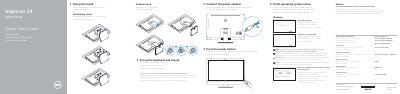
This Quick Start Guide from Dell walks through the initial setup of the Inspiron 24 5000 Series (model 24-5459) all-in-one computer running Ubuntu. It covers setting up the pedestal or articulating stand, installing the keyboard and mouse, connecting the power adapter, and pressing the power button to complete the on-screen setup.
The guide also identifies the computer's ports and controls, including USB 3.0 and USB 2.0 ports, HDMI-in and HDMI-out ports, headset and audio-out ports, media-card reader, network port, microphones, camera, and an optional optical drive. It points to Dell.com/support for manuals and drivers, explains how to create recovery media in Windows, and includes NOM regulatory information for Mexico.
| Input voltage | 100 V AC–240 V AC |
|---|---|
| Input frequency | 50 Hz–60 Hz |
| Input current | 2.50 A |
| Output voltage | 19.50 V DC |
| Output current | 4.62 A / 6.70 A |
When prompted, enter the password for the wireless network access.
In Windows search, type Recovery, click Create a recovery media, and follow the instructions on the screen.
The guide directs users to Dell.com/support and Dell.com/support/manuals for product support and manuals.