
Dell XPS 8700 Computer Quick Start Guide

This guide describes the quick start guide for Dell computers.
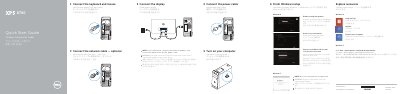

Dell XPS 8700 Computer Quick Start Guide - cover page
Brand
DELL
Category
Desktops
Document type
Quick Start Guide
Language
English
Pages
2
File format
PDF
File size
272 KB
Published
26 November, 2023
Updated
26 November, 2023
MD5 checksum
3E9B7DD59F9C80218EC94BBE89E83C58

About this manual

The Dell XPS 8700 Quick Start Guide provides step-by-step instructions for setting up the computer, including connecting peripherals, powering on the device, and completing the Windows setup process for both Windows 7 and Windows 8.

The document also includes a detailed map of the computer's external features, identifying various ports, buttons, and slots available on the chassis.

What's inside

  • Connect the keyboard and mouse
  • Connect the network cable
  • Connect the power cable
  • Turn on your computer
  • Connect the display
  • Finish Windows setup
  • Enable security and updates
  • Features

Specifications

Regulatory ModelD14M001
Expansion-card slots4

Frequently asked questions

Where should I connect the display if the computer has a discrete graphics card?

If the computer was ordered with a discrete graphics card, the display should be connected directly to that card.

Where should I connect the display if my computer was ordered with a discrete graphics card?

Connect the display to the discrete graphics card instead of the built-in video output.

Is there any character I should avoid when setting up my password?

Yes, do not use the @ symbol in your password.

How many USB 3.0 ports does the XPS 8700 have?

It has 2 USB 3.0 ports and 4 USB 3.0 ports listed among its features.

Download PDF (272 KB)

More DELL Manuals


View all DELL manuals →