
Dell™ OptiPlex™ All-in-One Stand User Guide.
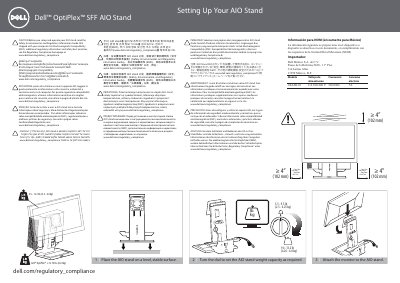
This two-page setup sheet from Dell shows how to assemble the Dell OptiPlex SFF AIO Stand. It lists eleven numbered steps in pictures and short captions: placing the stand on a level surface, turning the dial to set the weight capacity, attaching the monitor, connecting and routing the monitor cables, sliding the computer chassis into the stand, fitting the cable cover, locking the computer, connecting the network and power cable, and installing security accessories.
The document also states the stand's weight ranges and minimum clearance, gives the regulatory model number and Mexican NOM power information, and repeats a caution in several languages telling users to read the Safety, Environmental, and Regulatory Information Guide shipped with the computer and to visit www.dell.com/regulatory_compliance for EMC and other regulatory details.
| Weight capacity range | 5.5 - 13.2 lbs (2.5 - 6.0 kg) |
|---|---|
| Dell OptiPlex weight limit | ≤ 13.75 lbs (6.24 kg) |
| Dial setting range 1 | 5.5 - 9.3 lb (2.5 - 4.25 kg) |
| Dial setting range 2 | 9.4 - 13.2 lb (4.26 - 6.0 kg) |
| Minimum clearance | ≥ 4" (102 mm) |
| Regulatory model | 1KAIO-01 |
| Power input (per NOM information) | CA 100-240 V, 50/60 Hz, 7A |
Turn the dial on the stand to set the weight capacity as required.
Read the Safety, Environmental, and Regulatory Information Guide that shipped with your computer.
Dell points to the Regulatory Compliance homepage at www.dell.com/regulatory_compliance.
Slide the switch to lock the computer to the AIO stand.