
OptiPlex 5050 Micro Desktop Quick Start Guide
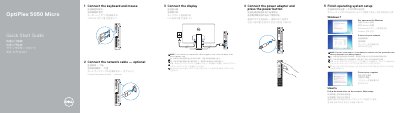
This Quick Start Guide outlines the essential steps to set up the Dell OptiPlex 5050 Micro desktop computer. It covers connecting the keyboard, mouse, network cable, and display, as well as attaching the power adapter and powering on the device. The guide also details the initial operating system setup process for Windows 7, Ubuntu, and other supported environments.
Connect the display to the discrete graphics card.
The USB 3.0 port with PowerShare supports it.
Enter the password for the wireless network access when prompted.