
Guide to setting up a Dell computer, including connecting the monitor, safety instructions, and a list of features.
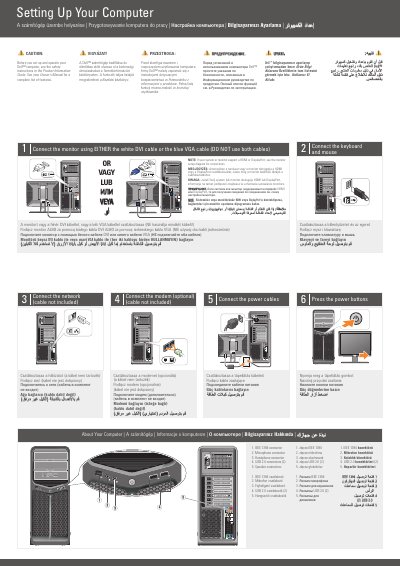
This two-page setup guide shows how to set up a Dell XPS 630i computer. It covers connecting the monitor with either a DVI or VGA cable, connecting the keyboard and mouse, connecting to a network, optionally connecting a modem, connecting power cables, and pressing the power buttons.
The guide also identifies the front-panel connectors, describes an optional wireless network setup, and points readers to the Owner's Manual and Dell support resources for more information.
| Monitor connection | DVI or VGA, not both |
|---|---|
| Network cable | Not included |
| Modem connection | Optional; cable not included |
| Front panel USB 2.0 connectors | 2 |
| Wireless network | Optional |
No. Use either the white DVI cable or the blue VGA cable; do not use both.
No, the network cable is not included.
No, connecting a modem is optional.
See the Owner's Manual; if you do not have a printed copy, click the Documentation and Support icon on the desktop or go to support.dell.com.