
This guide provides basic instructions for installing and setting up the Envoy communications gateway.
This quick install guide from Enphase is a condensed reference for installing and setting up the Envoy Communications Gateway, the gateway that detects Enphase microinverters and reports system performance to the Enlighten website. It directs installers to the full Envoy Installation and Operation Manual at enphase.com/support and covers finding the serial number, registering the Envoy in Enlighten, and placing it at an AC outlet close to the load center.
The guide walks through connecting the Envoy to a broadband router by Ethernet cable, power line communication bridges (included with model ENV-120-01), or the Enphase wireless adapter (included with ENV-120-02), installing the PV modules and microinverters, checking device detection on the LCD, and building the virtual array with Array Builder in Enlighten. A troubleshooting section addresses Wi-Fi, Internet connection, power line communication, and device detection issues.
| Internet connection methods | Ethernet cable, power line communication bridges, or Wi-Fi adapter |
|---|---|
| Included with ENV-120-01 | Power line communication bridges |
| Included with ENV-120-02 | Enphase Wireless Adapter |
| Typical device detection time | About 30 minutes (longer for large installations) |
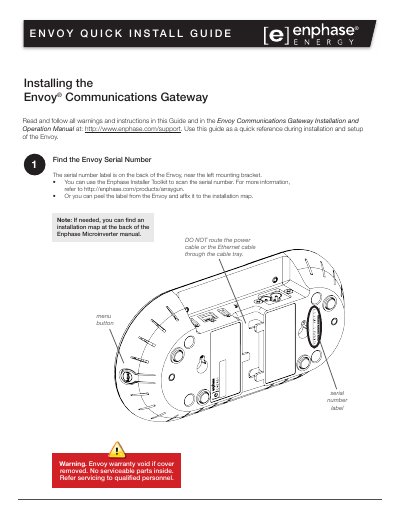
The serial number label is on the back of the Envoy, near the left mounting bracket. You can also scan it with the Enphase Installer Toolkit or peel the label onto the installation map.
Power strips, surge protectors, and uninterruptable power supplies impede power line communications, so the Envoy should be plugged into a dedicated wall outlet.
Plug the Enphase wireless adapter into the left USB port, press and hold the WPS button on the wireless router for two seconds, then press and hold the Envoy menu button until the LCD displays Enable Wi-Fi WPS.
After 15 minutes, make sure the broadband router is operational and other devices at the site can access the Internet. If it is, press and hold the Envoy menu button, release it when the LCD displays Get New IP Address, and wait 5 minutes.