
Polycom SoundStation2 Console Parts List and Instructions

This document is a list of parts and instructions for use for the SoundStation2 console
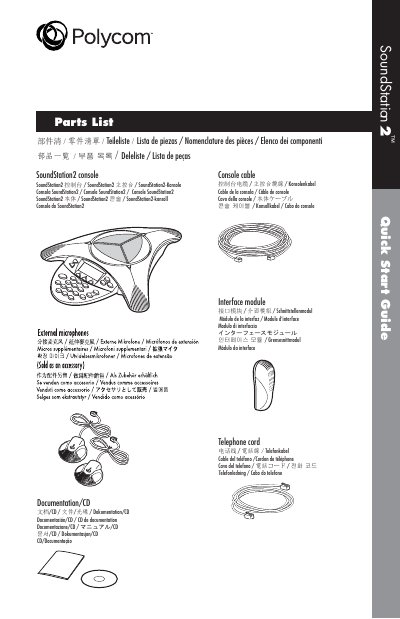

Polycom SoundStation2 Console Parts List and Instructions - cover page
Brand
Polycom
Category
Telephone
Document type
Parts List
Language
English
Pages
4
File format
PDF
File size
1.4 MB
Published
30 October, 2023
Updated
30 October, 2023
MD5 checksum
531249529A91C4774FF948CE5DCB9846

About this manual

This Polycom document lists parts for the SoundStation2 console, including the console, console cable, interface module, telephone cord, and documentation/CD with the SoundStation 2 Quick Start Guide. It also includes sections on required setup and additional setup options.

The LED Indicators section explains the meaning of each indicator color: green for a call in progress, red for a muted call, blinking red for a call on hold, and blinking green for an incoming call. A Buttons section is also included.

What's inside

  • Parts List
  • Required Setup
  • LED Indicators
  • Buttons
  • Additional Setup Options

Frequently asked questions

What does a green LED indicator mean on the SoundStation2 console?

Green means your call is in progress.

What does a red LED indicator mean on the SoundStation2 console?

Red means your call is muted.

What does a blinking red LED indicator mean on the SoundStation2 console?

Blinking red means your call is on hold.

What does a blinking green LED indicator mean on the SoundStation2 console?

Blinking green means a call is incoming.

Download PDF (1.4 MB)

More Polycom Manuals


View all Polycom manuals →