
Describes how to operate the display manager
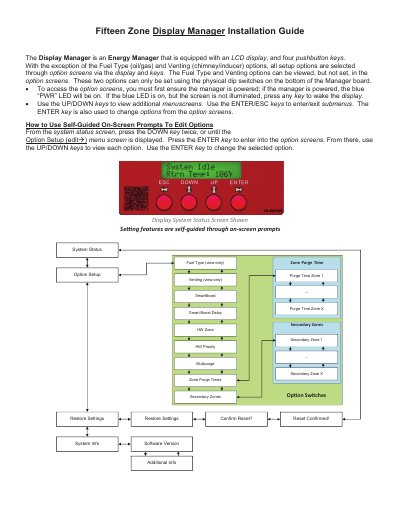
The Fifteen Zone Display Manager is a Honeywell Energy Manager with an LCD display and four pushbutton keys. All setup options are selected through option screens using the display and keys, except Fuel Type and Venting, which can only be set with the physical dip switches on the bottom of the Manager board.
The installation guide covers the 15-zone expanded Energy Manager. It describes removing the cover from the junction box, mounting and wiring additional transformers, and installing the expanded manager. It also lists dip switch settings, burner restart thermostat short cycle protection, manager reset, and option menu descriptions such as SmartBoost, SmartBoost Delay, HW Zone, HW Priority, Multipurge, Zone Purge Times, and Secondary Zones.
| SmartBoost | Default setting is OFF |
|---|---|
| SmartBoost Delay | Default setting is 25 Minutes |
| Burner Restart Thermostat short cycle protection | 25 seconds |
Ensure the manager is powered; if the blue PWR LED is on but the screen is not illuminated, press any key to wake the display.
They can be viewed but not set in the option screens; they can only be set using the physical dip switches on the bottom of the Manager board.
The default setting is OFF.