
This document is a quick guide to the XG-75 portable radio, which introduces the radio's power switch, power, volume, system/group/channel control, emergency/home, PTT, option, clear/monitor, A/B switch, etc.
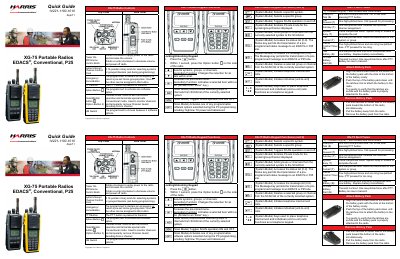
This quick guide explains the controls and functions of Harris XG-75 portable radios, including power, channel selection, PTT, emergency, and scan modes. It details how to transmit and receive calls in trunked and conventional modes, manage groups, and handle emergency situations. The guide also covers battery attachment/removal, status icons, and accessing menu features via the keypad or menu button.
Rotate the power/volume knob clockwise to turn on and increase volume; rotate counter-clockwise to decrease volume or turn off.
One low-pitched tone followed by one short mid-pitched tone.
Press and hold the red Emergency/Home button; the display shows F and it illuminated with +#TXEMER# flashing. Release PTT after transmission.