
This is a product instruction manual, which introduces the use of the product and precautions.
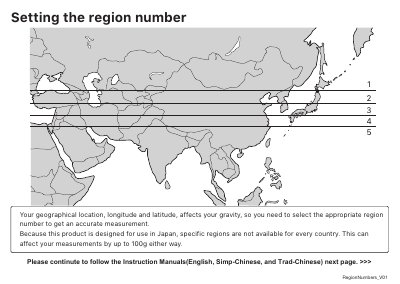
This manual guides users through setting region numbers, registering users, and measuring body composition. It includes safety warnings about using the device with medical equipment and proper placement on hard surfaces. The analyzer supports Wi-Fi connectivity via the ECLEAR app for data management.
Instructions cover user registration, guest mode, calibration, and interpreting visceral fat levels. Safety precautions include avoiding use with pacemakers, not stepping on edges, and not using the device on wet or soft surfaces.
| Model | HCS-WFS01 |
|---|---|
| Region Support | For use in Singapore and Hong Kong only |
| Battery Type | Four AAA batteries |
| Power Supply | USB Type-C port |
Refer to the 'Region Map' based on your geographical location, longitude, and latitude. This affects gravity and measurement accuracy.
No, never use this product with pacemakers or other implantable medical devices as it may cause malfunction or serious injury.
Perform automatic calibration by placing the analyzer on a hard surface, pressing the (on/setting) button, and ensuring "0.00kg" is displayed.