
This manual provides detailed instructions on how to download, install, configure and use the InnovApp TwoPointZero application to manage the main parameters of your air conditioner from your smartphone or tablet or from a dedicated desktop version, both at home and when you are away.
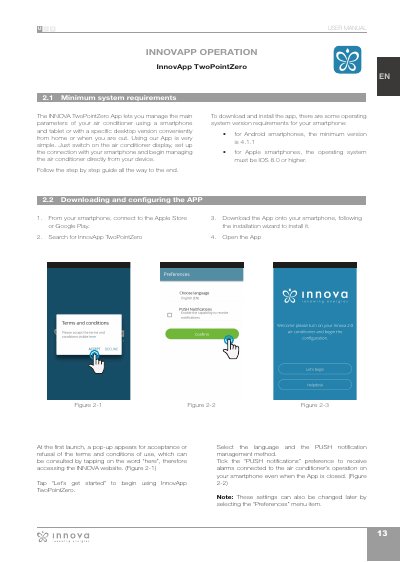
The INNOVA TwoPointZero App allows users to manage the main parameters of their air conditioner using a smartphone, tablet, or specific desktop version. The app is compatible with Android 4.1.1 and iOS 8.0 or higher. Users can download the app from the Apple Store or Google Play and follow the installation wizard to set up the connection with their device.
Once installed, the app enables the control of the air conditioner over the local network. Features include general control of start-up and shut-off, adjustment of temperature and operating modes, and weekly scheduling. Users can also configure remote access to manage the unit from anywhere in the world by connecting to the home WiFi network.
| Minimum Android version | 4.1.1 |
|---|---|
| Minimum iOS version | 8.0 |
| Serial number format | 9 alphanumeric characters |
| WiFi frequency support | 2.4GHz |
| TCP ports required | 80, 443, 19009, 18321, 18009 |
The app requires Android 4.1.1 or higher, or iOS 8.0 or higher.
Yes, but you must first configure remote access by connecting to your home WiFi network.
Select the 'Scheduling' item in the menu to access the calendar and define start-up and shut-down periods.
Only alphanumeric characters (A-Z, 0-9) and the symbols '-', '_', and '.' are permitted.