
Kodak W820/W1020 Digital Photo Frame User Manual

This is an instruction manual for a digital photo frame, which introduces the basic functions and operation methods of the frame.

Kodak W820/W1020 Digital Photo Frame User Manual - cover page
Brand
Kodak
Category
Digital cameras
Document type
User Manual
Language
English
Pages
30
File format
PDF
File size
1.6 MB
Published
17 October, 2023
Updated
17 October, 2023
Models
W820, W1020
MD5 checksum
321732E9FCF7BABA6550367265A8FECA

About this manual

This document is the user guide for the Kodak W820 or W1020 digital photo frame. It covers initial setup, including setting the language and adjusting the stand. The guide details how to use the Quick Touch borders for navigation and how to insert memory cards or connect USB devices to view photos and videos.

What's inside

  • Getting started
  • Using your frame's Quick Touch Borders
  • Setting your language
  • Connecting to your wireless network
  • Installing the software
  • Troubleshooting
  • Appendix

Specifications

Power Input12V DC
Wireless Power Level10 dBm

Frequently asked questions

How do I turn on the frame?

Press and hold the Power button for 2 seconds, then release.

Can I change the display orientation?

Yes, you can turn the stand to change it to portrait, but you must also change the setting in the menu.

What happens when screen icons appear?

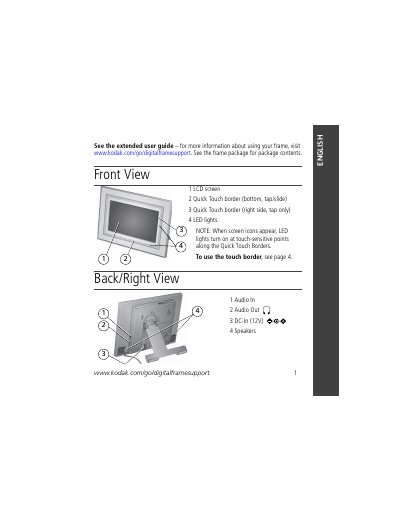
The LED lights turn on at the touch-sensitive points along the Quick Touch Borders.

Download PDF (1.6 MB)

More Kodak Manuals


View all Kodak manuals →