
This document describes the installation and setup methods of MOONS' STM23R Integrated Motor. The document provides detailed instructions on how to connect the power supply and switches, as well as how to select the running current and idle current. In addition, the document also introduces features such as self-test mode, subdivision setting, and digital input filtering.
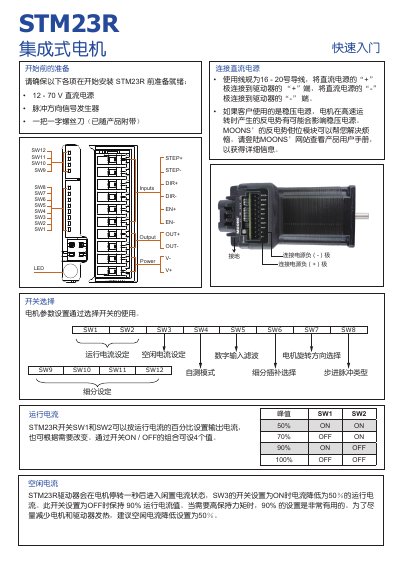
The document serves as a quick start guide for the MOONS STM23R integrated motor. It details how to connect power supplies using 16-20 gauge wire and explains the function of various DIP switches (SW1-SW12) for configuring parameters such as running current, idle current, microstepping resolution, and input filtering.
Key operational features described include a self-test mode activated by SW4 that moves the motor at 1rps in both directions. The guide also specifies how to set the motor rotation direction based on load inertia (SW7) and describes two pulse control modes: step-direction and continuous forward/reverse, selectable via SW8. This manual is written in Chinese.
| Operating Voltage Range | 12 - 70 V DC |
|---|---|
| Wire Gauge for Power Connection | 16 - 20 AWG |
| Self-Test Speed | 1rps |
| Microstepping Options | 16 types (Steps/Rev from 200 to 25600) |
| Digital Input Filter Frequency (SW5 ON) | 150 KHz |
| Digital Input Filter Frequency (SW5 OFF) | 2 MHz |
Set switch SW4 to ON. The driver will then move in both directions at a speed of 1rps.
Set switch SW3 to ON for 50% of running current, or OFF to maintain 90% of running current.
Set switch SW7 to ON or OFF depending on whether the load inertia ratio is high (5x to 10x) or low (0x to 4x).