
The Extech 445580 temperature and humidity pen can measure relative humidity ranging from 10% to 90% and temperature ranging from 14 to 122oF (0 to 50oC). Other features include minimum/maximum value memory, one-touch calibration, display hold, and auto power off.
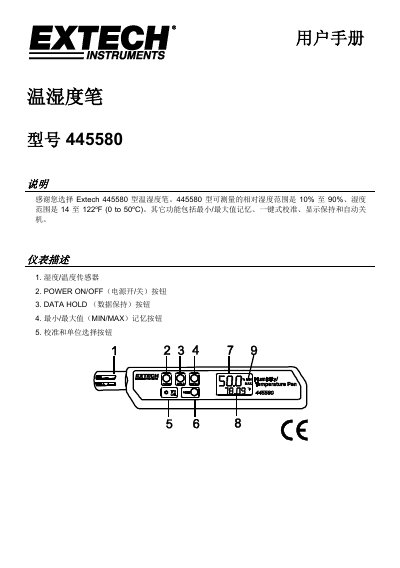
The Extech 445580 is a handheld instrument designed to measure relative humidity and temperature. Key features include minimum/maximum value memory, one-button calibration, data hold, and an automatic sleep mode that activates after approximately 20 minutes of inactivity. The device supports both Celsius and Fahrenheit temperature units. This manual is written in Chinese.
| Relative Humidity Resolution | 0.1% |
|---|---|
| Temperature Accuracy | ±1.0°C (±1.8°F) |
| Battery Type | 2032 Lithium |
| Battery Life | 150 hours |
| Response Time | 120 seconds |
| Dimensions | 175 x 42 x 16 mm |
Press the HOLD button to freeze the current reading on the display.
Long press the RESET button until the display shows '88.8'.
Error code E2 indicates a calibration error, requiring the instrument to be recalibrated.
The instrument automatically turns off after approximately 20 minutes of inactivity.