
This document provides a connection diagram and instructions for using accessories for the EVI-D70 series cameras. The cameras support non-TV format black and white and color modes and feature an intelligent digital interface. The cameras can be connected to a computer, TV, or VCR using a video cable or S-Video cable and can be controlled using VISCA RS-232C and RS-422. For connecting to a computer without a video input or S-Video input connector, a video capture board and/or software may be required. The document also provides instructions for using the AC power adapter and power cord.
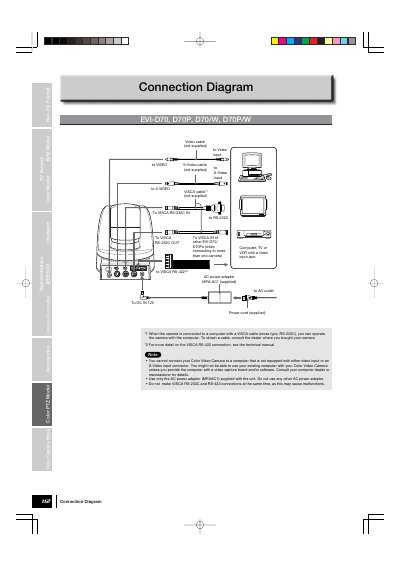
This document provides connection diagrams for Sony Color Video Cameras, including both TV and non-TV format models. It details the necessary cables and connections for operating the camera with a computer, TV, VCR, or other devices, as well as power and control connections such as VISCA, RS-232C, and RS-422.
You must use only the AC power adaptor (MPAAC1) supplied with the unit.
No, you cannot make these connections at the same time as it may cause malfunctions.
You must provide the computer with a video capture board and/or software.