
This document provides technical notes on using Analog Devices DSPs, processors, and development tools. It explains how to connect character LCD panels to ADSP-21262 SHARC DSPs and provides example code and hardware interface. Connecting a character LCD module to the DSP can serve as a user interface and a real-time debugging interface.
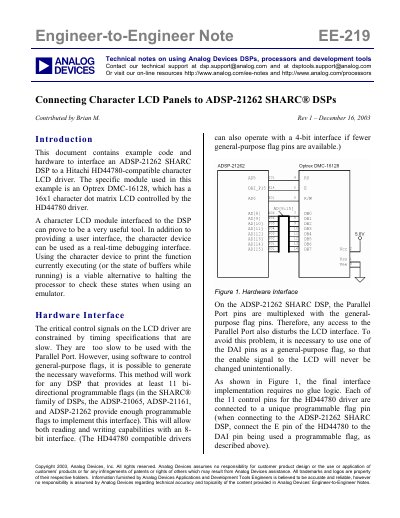
This document details how to interface an Optrex DMC-16128 character LCD module, driven by a Hitachi HD44780-compatible driver, to an ADSP-21262 SHARC DSP. It explains that the LCD control signals are too slow for the Parallel Port, requiring the use of general-purpose programmable flags (DAI pins) to generate the necessary waveforms. The hardware setup requires no glue logic, connecting each of the 11 control pins to a unique programmable flag pin.
The document provides C code listings compiled with VisualDSP++ version 3.0 service pack 1. It includes functions for reading from and writing to the LCD, initializing the display, printing strings, and manipulating the display (shifting and blinking). The software emulates hold times using NOP loops to ensure reliable communication with the slow LCD driver.
| LCD Module | Optrex DMC-16128 |
|---|---|
| LCD Driver | Hitachi HD44780-compatible |
| DSP Model | ADSP-21262 SHARC |
| Development Suite | VisualDSP++ version 3.0 |
| Interface Type | 8-bit interface |
Each of the 11 control pins for the HD44780 driver is connected to a unique programmable flag pin on the DSP.
A variable potentiometer connected to the Vee pin is used to control the contrast.
The code fragments are written in C and compiled using the VisualDSP++ development suite.