
This document describes how to simultaneously run two network interfaces with ADSP-BF537 and ADSP-BF536 Blackfin® processors. It provides the hardware and software prerequisites and presents the test results based on a hardware setup consisting of an ADSP-BF537 EZ-Kit Lite® evaluation system and a Blackfin USB-LAN EZ-Extender card.
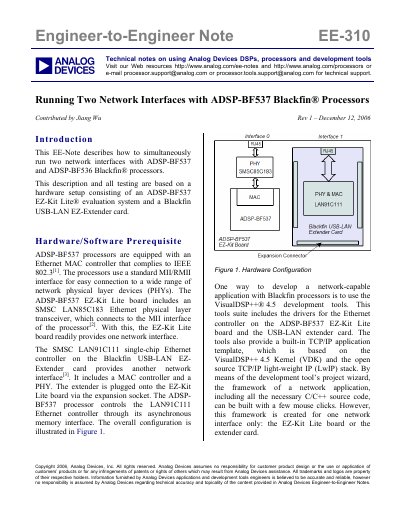
This document details a technical procedure for configuring the ADSP-BF537 and ADSP-BF536 Blackfin processors to operate with two simultaneous network interfaces. The described setup utilizes an ADSP-BF537 EZ-Kit Lite evaluation system equipped with an SMSC LAN85C183 Ethernet transceiver and a Blackfin USB-LAN EZ-Extender card containing an SMSC LAN91C111 controller.
| Ethernet MAC Compliance | IEEE 802.3 |
|---|---|
| Interface Type | MII/RMII |
| Development Tool Version | VisualDSP++ 4.5 |
The description and testing are based on an ADSP-BF537 EZ-Kit Lite evaluation system and a Blackfin USB-LAN EZ-Extender card.
No, the document states that VisualDSP++ 4.5 does not provide a project wizard for two network interfaces and most work must be done manually.