
Sharp XL-MP60 Micro Component System Quick Guide

This manual describes how to use the XL-MP60 micro component system.
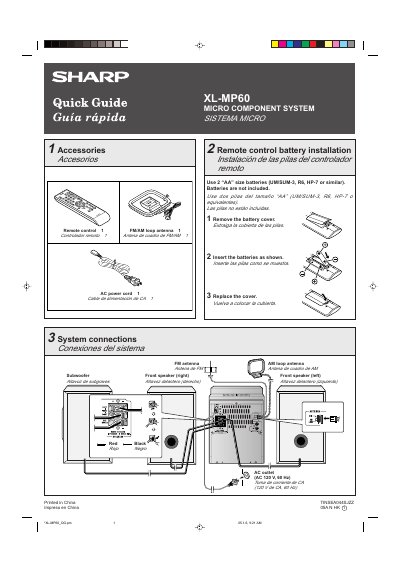

Sharp XL-MP60 Micro Component System Quick Guide - cover page
Brand
Sharp
Category
Other Electronics
Document type
Quick Start Guide
Language
English
Pages
2
File format
PDF
File size
313 KB
Published
03 August, 2012
Updated
30 September, 2023
Model
XL-MP60
MD5 checksum
9C39085521E8917B42F64617EF2A872F

About this manual

This document is a bilingual Quick Guide (English/Spanish) for the Sharp XL-MP60 Micro Component System. It provides step-by-step instructions for installing batteries in the remote control and connecting the audio system to an AC outlet, including wiring diagrams for speakers and antennas.

The guide details how to operate the unit, specifically explaining how to exit the demonstration mode upon first power-on. It also covers basic functions such as playing CDs (including multi-tray loading) and tuning into FM or AM radio stations.

What's inside

  • Accessories
  • Remote control battery installation
  • System connections
  • Turn on your system
  • Listening to a disc
  • Listening to the radio

Frequently asked questions

What type and size of batteries are required for the remote control?

The remote control requires two 'AA' size batteries, such as UM/SUM-3, R6, or HP-7.

What is the required AC power rating for the system?

The system must be connected to an AC outlet rated at 120 V, 60 Hz.

How long must the TUNING button be held to start automatic scanning?

You must press the TUNING button for more than 0.5 seconds to start scanning.

Download PDF (313 KB)

More Sharp Manuals


View all Sharp manuals →