
The document describes the connections between a remote control, speakers, and a television, as well as some features and characteristics of the products.
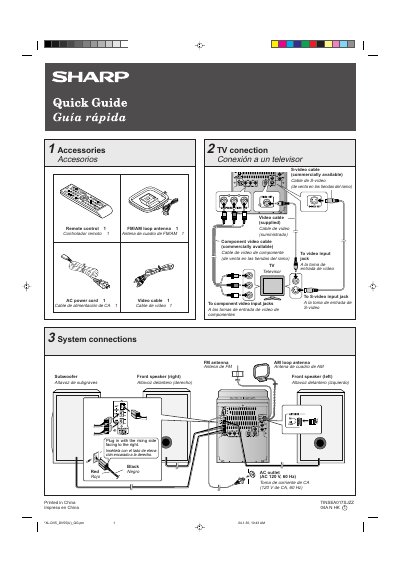
This document serves as a quick guide for the Sharp XLDV50 system. It lists the included accessories, such as an FM/AM loop antenna, remote control, and various video cables. It also details the system connections, specifying requirements for AC power (120 V, 60 Hz) and antenna placement.
| AC Power | 120 V, 60 Hz |
|---|---|
| Remote Control Battery | 2 "AA" size batteries |
The unit will enter the demonstration mode, and you will see words scroll.
Press the X-BASS/DEMO button to cancel the demonstration mode.
Press the TUNING button for more than 0.5 seconds to start scanning.