
SIRIUS XM Xpress RCi Quick Start Guide

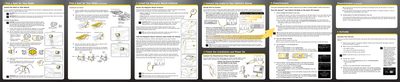
This document describes how to install the Xpress RCi in a vehicle.

SIRIUS XM Xpress RCi Quick Start Guide - cover page
Brand
SIRIUS
Category
Car Speakers
Document type
User Manual
Language
English
Pages
2
File format
PDF
File size
3.3 MB
Published
06 July, 2012
Updated
01 October, 2023
MD5 checksum
A07136533351BD67F8D6F8E7FD905507

About this manual

This document is a Quick Start Guide for the SIRIUS XM Xpress RCi satellite radio receiver. It details the initial setup process, including selecting a mounting location (dash or vent), installing the magnetic mount antenna, and connecting the audio to the vehicle's stereo system using Aux In, Cassette Adapter, or FM Transmitter methods. The guide also covers hiding the antenna cable and powering the unit via the PowerConnect adapter.

What's inside

  • Pick a Spot for Your Radio
  • Install the Magnetic Mount Antenna
  • Connect the Audio to Your Vehicle's Stereo
  • Install the Dash or Vent Mount
  • Activate Your Service
  • Tune the Xpress and Vehicle FM Radio
  • Finish the Installation and Power On
Download PDF (3.3 MB)

More SIRIUS Manuals


View all SIRIUS manuals →