
This document is the instruction manual for 30-496 IDEAL TeleMaster™. This tool can be used to cut old connectors, strip cable jackets, arrange wire order, trim wires, and insert them into modular plugs. It is recommended to test the cable assembly with an IDEAL wiremap tester. This product is suitable for cable assembly.
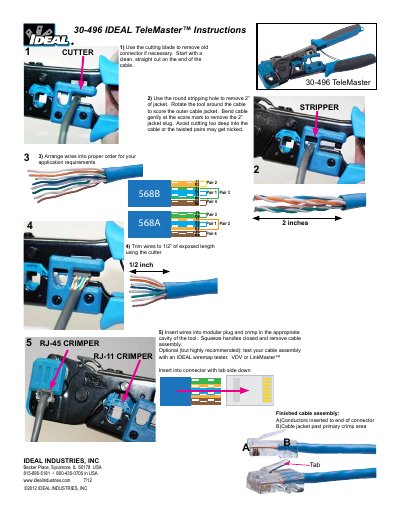
The IDEAL TeleMaster 30-496 is a hand tool designed for preparing and terminating telephone and data cables. The instructions cover the use of integrated cutting blades, stripping holes, and crimping cavities to assemble modular plugs.
To use the tool, first remove old connectors if necessary by making a clean cut with the blade. Next, rotate the tool around the cable using the round stripping hole to score and remove 2 inches of jacket. Arrange and trim wires to 1/2 inch exposed length before inserting them into the modular plug. Finally, crimp the assembly in the appropriate cavity and squeeze handles closed.
You should remove 2 inches of the jacket.
Trim the wires to leave 1/2 inch of exposed length.