
This document details the usage of Brother FAX 560, FAX 580MC, MFC 660MC.
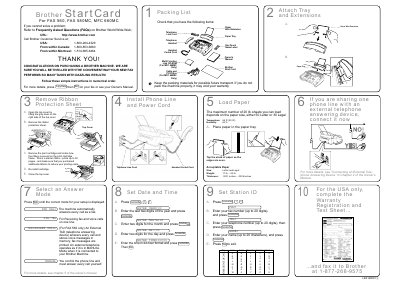
This document is a Start Card for Brother FAX 560, FAX 580MC, and MFC 660MC machines. It serves as a packing list to verify included items such as the Start Card, wire extension, telephone cord, and paper tray. It also provides contact information for Brother Customer Service in the USA, Canada, and Montreal.
| Maximum paper sheets (Letter) | 50 |
|---|---|
| Maximum paper sheets (Legal) | 30 |
| Operating Temperature | 68 °F (20 °C) |
| Operating Humidity | 60 % |
| Starter ribbon pages | 30 |
| Paper Weight | 20 lb. — 24 lb. |
| Paper Thickness | .0031 inches — .0039 inches |
| Fax number capacity | up to 20 digits |
| Telephone number capacity | up to 20 digits |
| Station ID name capacity | up to 20 characters |
Press [Copy/Help] then [Stat] on your fax or see your Owner's Manual.
The starter ribbon prints up to 30 pages.
The acceptable paper weight is between 20 lb. and 24 lb.