
Brother FAX-2800/2900/3800 Quick Setup Guide

This manual describes how to use the Brother FAX-3800 multi-function device.
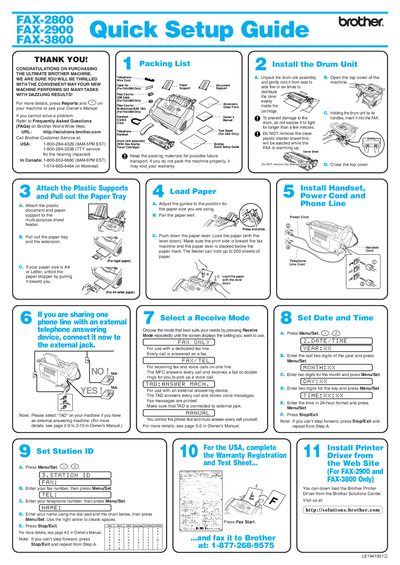

Brother FAX-2800/2900/3800 Quick Setup Guide - cover page
Brand
Brother
Category
Fax machine
Document type
Quick Start Guide
Language
English
Pages
1
File format
PDF
File size
333 KB
Published
02 July, 2012
Updated
30 September, 2023
MD5 checksum
F9ED4DEE4713778B3156E8FFF87FF754

About this manual

This document serves as a Quick Setup Guide for the Brother FAX-2800, FAX-2900, and FAX-3800 machines. It provides step-by-step instructions for unpacking the machine, installing the drum unit assembly, loading paper into the multi-purpose sheet feeder or tray, and connecting the power cord and handset.

What's inside

  • Packing List
  • Install the Drum Unit
  • Load Paper
  • Attach Plastic Supports
  • Power Cord and Handset
  • Phone Line
  • Receive Mode
  • Set Date and Time
  • Set Station ID
  • Test Sheet

Frequently asked questions

What is the maximum number of times the Fax Start button should be pressed?

Press the Fax Start button three times.

Download PDF (333 KB)

More Brother Manuals


View all Brother manuals →