
This document is the user manual for HP LC2640N and HP LC3040N LCD televisions.
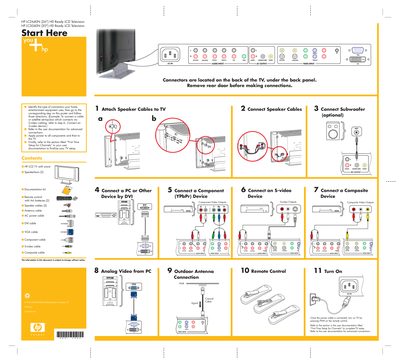
This poster provides a visual, step‑by‑step guide for the first‑time installation of HP LC2640N (26") and LC3040N (30") HD Ready LCD televisions. It shows where the rear connectors are located and the order of connections for speakers, subwoofer, and video sources.
Key steps include attaching speaker cables, connecting the subwoofer, selecting the appropriate video input (AV, S‑video, component, DVI, VGA, etc.), and powering the TV before completing channel setup using the full user manual.
| Screen size | 26" (LC2640N) / 30" (LC3040N) |
|---|---|
| TV type | HD Ready LCD Television |
Attach the speaker cables to the TV as shown in step 1 of the poster, then connect the other ends to the speakers.
Connect the power cable, turn on the TV by pressing PWR on the remote, then follow the “First Time Setup for Channels” section in the user documentation.