
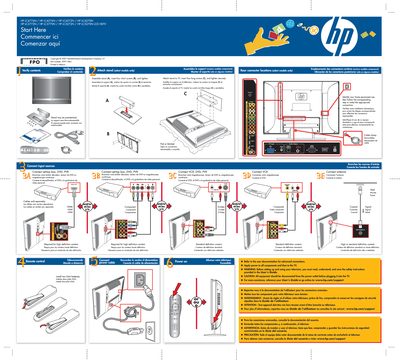
HP LCD HDTV (LC4776N etc.) Quick Start Setup Guide


HP LCD HDTV (LC4776N etc.) Quick Start Setup Guide - cover page
Brand
HP
Category
Television
Document type
Quick Start Guide
Language
English
Pages
1
File format
PDF
File size
1.5 MB
Published
04 June, 2012
Updated
29 June, 2012
MD5 checksum
A4F388FEAE21D622F7DAA93BB76C5E66

About this manual

This quick‑start guide provides step‑by‑step instructions for assembling the stand, connecting input sources and applying power to HP LCD HDTVs. It includes safety warnings and notes on required accessories.

The poster is multilingual (English, French, Spanish) and lists optional cables (HDMI, S‑Video) as sold separately, as well as the remote’s requirement for two AAA batteries.

What's inside

  • Start Here
  • Assemble Stand
  • Connect Input Sources
  • Rear Connector Locations
  • Safety Instructions
  • Remote Control Batteries
  • Cable Requirements

Frequently asked questions

How do I assemble the stand?

Attach the stand, insert four short screws (B) and four long screws (C), then tighten securely.

Are HDMI cables included?

No, HDMI cables are sold separately.

What batteries does the remote control use?

The remote uses two AAA batteries.

Download PDF (1.5 MB)

More HP Manuals


View all HP manuals →