
This document introduces a product from the brand ASRock, the model is not mentioned. The product features include compatibility with various front-end bus processors, Intel G31 chipset, dual-channel DDR2 memory technology, Intel Graphics Media Accelerator 3100 display core, and 5.1 channel high-fidelity audio.
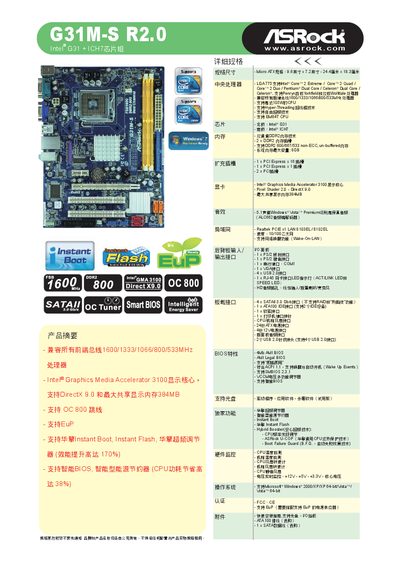
The G31M-S R2.0 is an LGA775 motherboard built around the Intel G31 northbridge and ICH7 southbridge. It supports a wide range of Intel CPUs, up to 105 W, and offers dual‑channel DDR2 memory, PCI Express x16 and x1 slots, four SATA 3.0 Gb/s ports, and integrated graphics, audio, and LAN.
The manual also describes ASRock‑specific technologies such as Instant Boot, Instant Flash BIOS utility, Smart BIOS, and EU‑energy‑using‑product (EuP) power‑saving features. Detailed connector layouts, power‑connector pin‑outs, and quick‑install guidance are included to help users assemble and configure the system. This manual is written in Chinese.
| CPU Socket | LGA775 |
|---|---|
| Maximum CPU Power | 105 W |
| Northbridge Chipset | Intel G31 |
| Southbridge Chipset | Intel ICH7 |
| Memory Type | DDR2 800/667 non‑ECC, unbuffered |
| PCI Express x16 Slots | 1 |
| PCI Express x1 Slots | 1 |
| SATA Ports | 4 × SATA 3.0 Gb/s |
| Audio Codec | Realtek ALC662 |
| LAN Controller | Realtek 8103EL |
| USB 2.0 Ports | 4 |
| Power Connectors | 24‑pin ATX, 4‑pin 12V |
The board supports LGA775 processors including Intel Core2 Extreme, Core2 Quad, Core2 Duo, Pentium Dual‑Core, Celeron Dual‑Core, Penryn, Yorkfield and Wolfdale, up to 105 W.
Use the ASRock Instant Flash utility; press F6 during boot and the program will detect the appropriate BIOS version for the motherboard.
The board supports EuP (Energy Using Product) compliance, Smart BIOS power‑saving options, and ASRock’s Instant Boot and Hybrid Booster technologies to reduce power consumption.