
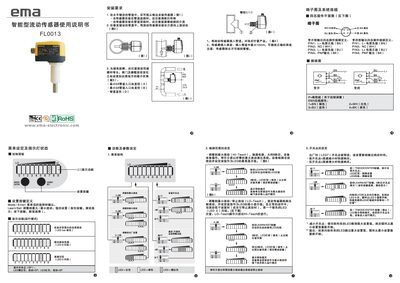
This manual describes how to install the EMA FL0013 flow sensor in horizontal pipelines, including recommended mounting positions, minimum pipe diameters, and precautions for sediment and media flow direction. It also explains the menu functions, LED indicators, and how to set high and low flow points (HI‑Teach and LO‑Teach) using the LEARN/SET keys.
The document details the electrical connections, including the four‑pin plug definitions for both normally‑open and normally‑closed outputs, and explains the remote adjustment feature that allows flow set points to be changed via a remote control line. Technical parameters such as operating voltage, load current, protection rating, temperature range, and flow measurement range are also listed. This manual is written in Chinese.
| Operating Voltage | 20‑36 VDC |
|---|---|
| Maximum Load Current | 400 mA |
| Protection Level | IP67 |
| Operating Temperature | -25 °C to 80 °C |
| Flow Measurement Range | 0 – 60 cm/s |
Press and hold the LEARN/SET button to enter HI‑Teach mode; after power‑on and an 8‑second delay, the device will detect the maximum flow and set the LED’s highest display value.
Connect the remote adjustment line to the sensor’s L+ pin; after pressing LEARN/SET, the LEDs flash for 2‑3 seconds, then the device stores the current flow as the new set point and returns to operation mode.