
This document explains how to read the temperature and supply voltage of Sensirion's I2C flow and differential pressure sensors, which are based on the SF04 thermal flow sensor chip.
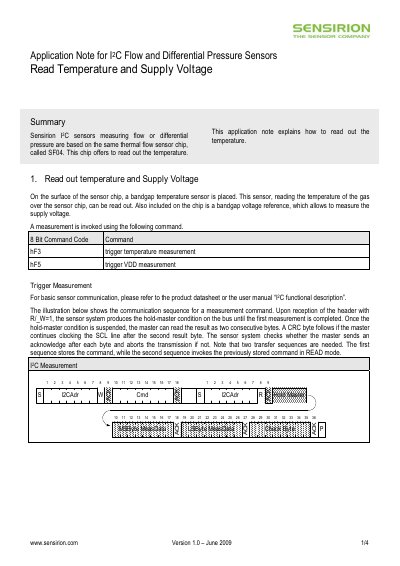
The document describes the procedure for obtaining temperature and supply‑voltage measurements from Sensirion's SF04 sensor chip via I²C. It details the command codes (0xF3 for temperature, 0xF5 for voltage) and the communication sequence, including the hold‑master condition and CRC handling.
It also covers optional scale/shift correction by setting bit 10 of the user register, how to read and write the user register (commands 0xE3 and 0xE2), and provides the sensor’s temperature measurement specifications such as range, resolution, and accuracy.
| Measurement Range | -15°C to 70°C |
|---|---|
| Digital Resolution | 0.1°C |
Send the 0xF3 command to trigger a temperature measurement, then read the two result bytes after the hold‑master condition is released.
Set bit 10 of the user register; this changes the output to an integer value with the appropriate scale factors.
Use the 0xE3 command; the sensor returns the most‑significant byte followed by the least‑significant byte of the register.
Send the 0xE2 command followed by the two bytes of the new register value.