
Key facts
Start here
Sensirion SF04 Application Note Read Temperature and Supply Voltage
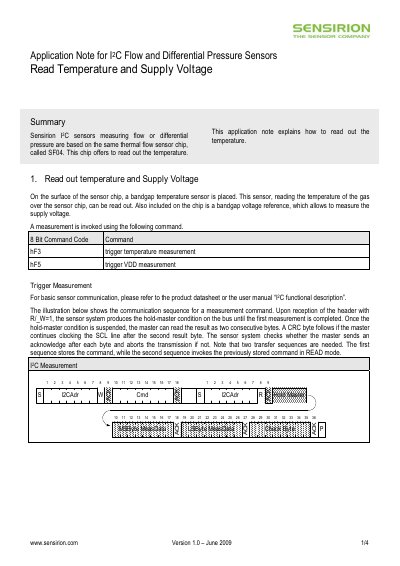
The document describes the procedure for obtaining temperature and supply‑voltage measurements from Sensirion's SF04 sensor chip via I²C. It details the command codes (0xF3 for temperature, 0xF5 for voltage) and the communication sequence, including the hold‑master condition and CRC handling.
It also covers optional scale/shift correction by setting bit 10 of the user register, how to read and write the user register (commands 0xE3 and 0xE2), and provides the sensor’s temperature measurement specifications such as range, resolution, and accuracy.
SENSIRION SF04 specifications
| Sensor output format | 16‑bit integer |
|---|---|
| Scale factor EEPROM address | h2B6 |
| Measurement unit EEPROM address | h2B7 |
| Serial number (chip) EEPROM address range | h2E4‑h2E7 |
| Calibration changeability | Scale factor and measurement unit cannot be changed after calibration |
Source: Sensirion SF04 I2C Flow and Differential Pressure Sensors Application Note
All SENSIRION SF04 documents by type
How to use the product for one specific task, with worked examples.
Questions answered in these manuals
How can I read the temperature from the SF04 sensor?
Send the 0xF3 command to trigger a temperature measurement, then read the two result bytes after the hold‑master condition is released.
From: Sensirion SF04 Application Note Read Temperature and Supply Voltage
How do I enable scale/shift correction for temperature and supply voltage?
Set bit 10 of the user register; this changes the output to an integer value with the appropriate scale factors.
From: Sensirion SF04 Application Note Read Temperature and Supply Voltage
How do I read the scale factor from the sensor?
Set the EEPROM address to h2B6 using the set‑address command (0xFA) and then perform an I2C read to retrieve the scale factor word.
From: Sensirion SF04 I2C Flow and Differential Pressure Sensors Application Note
Where is the sensor serial number stored?
The chip serial number is stored in the EEPROM at addresses h2E4 (MSB) through h2E7 (LSB).
From: Sensirion SF04 I2C Flow and Differential Pressure Sensors Application Note