
MAX3232E is a multichannel RS-232 line driver/receiver from TI with ±15kV IEC ESD protection. It can be used for battery-powered systems, PDAs, notebooks, palmtop PCs, etc.
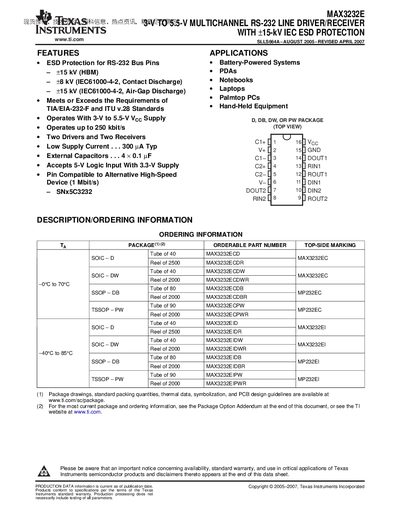
The MAX3232E is a dual‑driver, dual‑receiver RS‑232 line interface that operates from a single 3 V to 5.5 V supply. It offers up to 250 kbit/s data rates and includes +15 kV IEC ESD protection on all serial‑port pins.
The document lists ordering options, absolute maximum ratings, recommended operating conditions, electrical characteristics for both driver and receiver sections, and mechanical package data. It also contains application notes, typical circuit examples, and TI’s standard warranty and safety notices.
| Supply voltage range | 3 V to 5.5 V |
|---|---|
| Maximum data rate | 250 kbit/s |
| ESD protection rating | +15 kV IEC (HBM) / +8 kV IEC |
| Low supply current (typical) | 300 µA |
| Maximum driver slew rate | 30 V/µs |
The device operates from 3 V up to 5.5 V supply voltage.
It can handle data rates up to 250 kbit/s.
The part offers +15 kV IEC (HBM) and +8 kV IEC ESD protection on its pins.
Typical low‑supply current is about 300 µA.