
Canon PIXMA MP140 Series Installation Guide


Canon PIXMA MP140 Series Installation Guide - cover page
Brand
Canon
Category
Printer
Document type
Installation Guide
Language
Chinese
Pages
2
File format
PDF
File size
3 MB
Published
01 April, 2012
Updated
30 May, 2012
MD5 checksum
F94A2A4EF9A021D8CE98B7E6BB9079BE

About this manual

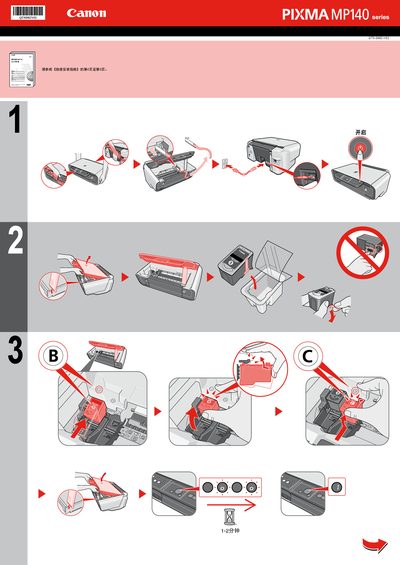
This short guide provides step‑by‑step instructions for installing the Canon PIXMA MP140 series printer. It includes connecting the printer, aligning the printhead, and installing the required software.

The guide also contains a brief license agreement and notes on selecting the appropriate region settings during setup. This manual is written in Chinese.

What's inside

  • Installation Overview
  • Printer Connection
  • Printhead Alignment
  • Software Installation
  • License Agreement
Download PDF (3 MB)

More Canon Manuals


View all Canon manuals →