
This manual provides detailed instructions on how to install, use and maintain the A series label printer, and provides some common troubleshooting methods.
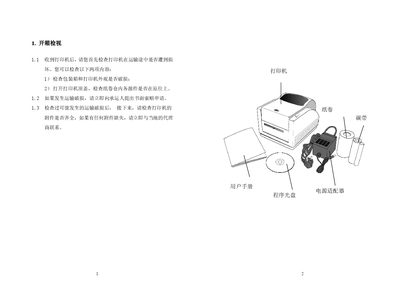
The manual begins with an unboxing checklist, guiding users to inspect the printer’s exterior, packaging and internal components for any transport damage and to verify that all accessories are present. It then explains how to safely connect the power adapter, insert the paper roll, and install the ribbon (if required) before powering on the device.
Operating instructions cover the three available modes—Standard, Peel and Cutter—detailing how to select each mode, load labels, and use the feed button. Safety warnings, component descriptions, and a short user‑survey form are also included. This manual is written in Chinese.
| Supported operating modes | Standard, Peel, Cutter |
|---|