
This document provides a detailed introduction to the features and characteristics of Hiendah B825 5G radio, including the appearance design, function configuration, performance parameters, etc.
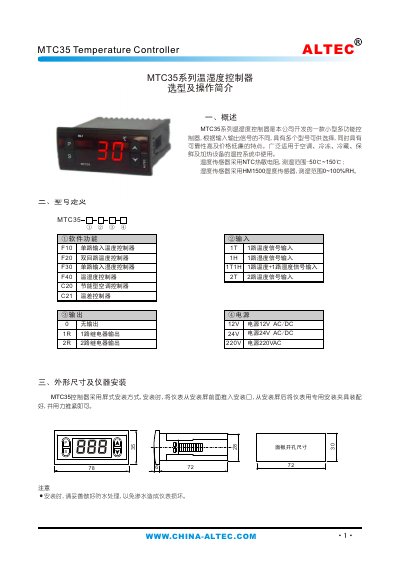
The MTC35 series temperature and humidity controller is a compact, multifunction device designed for air‑conditioning, refrigeration, preservation and heating applications. It supports various input configurations and offers reliable, low‑cost performance.
The manual covers model definitions, physical dimensions, installation steps, panel layout, electrical connections, operating procedures, fault codes, and detailed technical data such as sensor types, ranges, accuracy, power supply options and relay ratings. This manual is written in Chinese.
| Temperature sensor type | NTC thermistor |
|---|---|
| Temperature range | -50 °C to 150 °C |
| Humidity sensor type | HM1500 humidity sensor |
| Humidity range | 0 % RH to 100 % RH |
| Sampling period | 125 ms |
| Relay contact capacity | 5 A (8 A) / 250 VAC |
| Power supply options | 220 VAC, 24 V AC/DC |
| Dimensions (W×H×D) | 78 mm × 35 mm × 78 mm |
| Mounting dimensions (W×H) | 72 mm × 30 mm |
| Operating temperature range | -20 °C to 55 °C |
| Maximum relative humidity | 85 % RH |
Press the S key; a lit dot in the upper‑right corner shows outdoor temperature, while an unlit dot shows indoor temperature.
An open‑circuit sensor shows fault code “ur”, and a short‑circuit sensor shows fault code “Snb”.
Use the P, S, + and – keys: press P to select the setpoint, then adjust its value with + or –, confirming with S.