
ALTEC Power 220V AC ALTEC Shenzhen ALTEC Electronics Co., LTD. - 2 3 RL1 °( P S MTC35 ALTEC 5 4 1 2 6 7 8 RL2 RL1 1 2 3 4 5 6 7 8 9 10 11 12 NTC Temp. sensor MTC35-C20-2T-2R-220V MTC35-C20 Temperature Controller Instruction Manual 2. Coding ① Software Function C20 Air conditioner Temp. controller ② Input ③ Output 2T 2 temperature sensors 2R 2 Relays MTC35-C20-2T-2R-220V ① ② ③ ④ ④ Power Supply 220V 220V AC 1. Introduction The MTC35-C20 Temperature Controller is a particularly flexible controller, which allows On/Off control of indoor temperature for energy saving. The controller has two temperature sensors(one for indoor, other for outdoor) as input and two outputs which are controlled by a MCU according to value programmed for the parameters in Parameter List. Temperature sensor: NTC, range: -50~150 °C. To get the best performance, before installing and using it, read this instruction manual carefully. 1) Prepare a rectangular cut-out in the mounting panel to the size . 2) Insert the controller from the front panel cut-out. 3) From behind of the panel, slide the mounting brackets into the guides on the side of the housing. The flat faces of the mounting brackets must lie against the housing. 4) Push the mounting brackets up to the back of the panel, and tighten them evenly. 72×30mm Note: Please completes waterproof processing properly, in order to avoid seeps causes the instrument damage. 3. Dimensions and Mounting 35 28 78 72 6 888 P S ①.Up Key ②.Down Key ③.Dispaly Indicates PV, Parameters and Values ④.Setting Key(S) ⑤.Parameter Key(P) 4. Front Panel Layout 3 ⑥.Output 1 indicator(RL1) ⑦.Output 2 indicator(RL2) ⑧.Outdoor Temp. displaying indicator(T2) lit when outdoor temperature is displaying 5. Electrical Connection 6.1 Viewing the PV Mounting and wire up the controller and switch on, 3 seconds later, the indoor measured temperature will appear on display. Indoor temperature T1 and outdoor temperature T2 displaying can be exchange by pressing S key. When the ‘ ’ is lit, the display indicates the outdoor temperature. 6.2 Setpoint Adjusting During the basic functioning, press key 'P' and hold for 1 second, temperature setpoint L1 appears on the display. Press key 'S', the value of L1 appears; press keys ▲ or ▼ to increase or decrease setpoint. Keeping it pressed results in a progressively faster variation. Press key 'P' again, next parameter KY1 appears, setting its value in the same way. Outdoor Temp. displaying indicator 6. Operation WWW.ALTEC.CC Indoor T1 Outdoor T2 N L F C C: Air Conditioner F: Aeration Fan ALTEC Technical Data While temperature sensor connection breakdown VR is displayed, or while overrange SNB is displayed. At this time, relay output are determined by PF1 as shown in the parameter list. 6.5 Sensor Failure WWW.ALTEC.CC Sample rate Measurement range Resolution Temperature sensor Relay contact rating Control algorithm Power supply Environmental -50~150 °C 1 °C NTC, PVC Wire, 2.0m 5(8)A/250VAC 125ms ON/OFF 220V AC
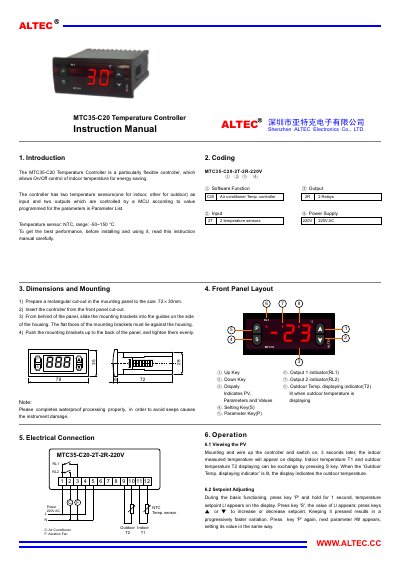
This manual introduces the MTC35-C20 temperature controller, a flexible device that controls indoor temperature for energy saving using two NTC sensors and two relay outputs. It explains the controller’s functions, sensor ranges, and basic operation principles.
The guide covers mounting preparation, front‑panel layout, electrical connections, set‑point adjustment, and detailed operation logic, including how the relays drive an air‑conditioner or aeration fan based on temperature comparisons. Technical data such as power requirements, dimensions, and environmental limits are also listed. This manual is written in Chinese.
| Temperature Sensor Type | NTC, range -50~150 °C |
|---|---|
| Relay Contact Rating | 5(8)A / 250V AC |
| Dimensions | W78 mm × H35 mm × D78 mm |
Press key ‘P’ and hold for 1 second to display L1, then press ‘S’ and use the ▲/▼ keys to change the value.
When the outdoor temperature T2 exceeds the setpoint L1, relay RL1 turns ON, which starts the air conditioner.