
This document introduces the exterior dimensions, installation, electrical connections, panel introduction, and operating instructions of the ALTEC MTC35-F40 temperature and humidity controller. The controller has the characteristics of simultaneous control of temperature and humidity, high reliability, and low price, and is suitable for controlling environmental temperature and humidity.
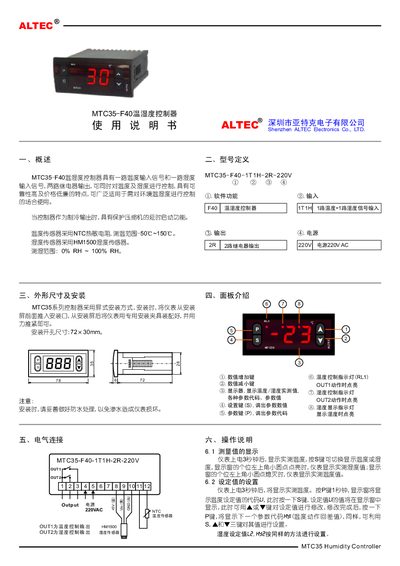
The MTC35-F40 is a temperature and humidity controller with one temperature input, one humidity input, and two relay outputs. It uses an NTC thermistor for temperature measurement (-50 °C ~ 150 °C) and an HM1500 sensor for humidity measurement (0 % RH ~ 100 % RH). The unit operates from a 220 V AC supply and includes indicator LEDs for temperature and humidity control.
The manual covers dimensions and mounting (78 mm × 35 mm × 78 mm, opening 72 × 30 mm), panel description, electrical connections, installation steps, operation procedures, parameter code settings, fault codes, and adjustment algorithms. It also provides technical data such as working temperature range, power consumption, and sensor specifications. This manual is written in Chinese.
| Temperature measurement range | -50 °C ~ 150 °C |
|---|---|
| Humidity measurement range | 0 % RH ~ 100 % RH |
| Power supply | 220 V AC |
| Relay outputs | 2 relay outputs |
| Input signals | 1 temperature input, 1 humidity input |
| Physical dimensions | 78 mm × 35 mm × 78 mm |
| Installation opening size | 72 mm × 30 mm |
| Operating temperature range | -20 °C ~ 55 °C |
Press the P key to display the temperature setpoint code L1, press S to show the current value, then use the ▲/▼ keys to adjust it and press P again to confirm.
OUT1 indicates the temperature control output, while OUT2 indicates the humidity control output.
When the output is set to cooling, the controller adds a delayed start to prevent frequent compressor start‑stop cycles, protecting the compressor.
The controller displays fault code VR when the temperature sensor is disconnected.