
This document explains how to connect and use a DVD system, and how to watch DVD movies through a TV. It also provides some suggestions and tips, such as using high-quality video connections and an accessory RF modulator.
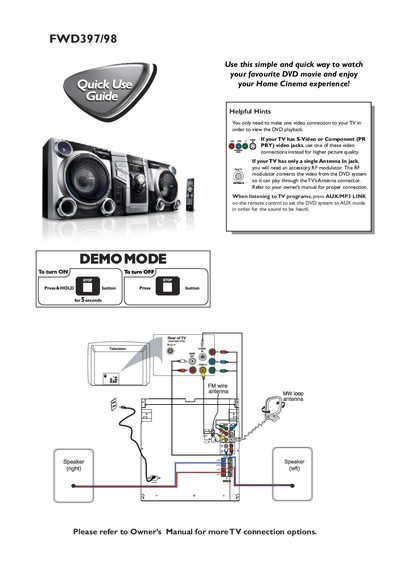
This guide explains how to set up the Philips FWD397/98 DVD system, connect it to a TV, and start watching DVDs. It covers power‑on procedures, video connection options, and basic remote‑control functions.
Key steps include pressing and holding the power button for five seconds, selecting the appropriate video input (S‑Video, Component, or RF modulator), loading a disc, and using the remote to control playback. Region‑code compatibility and the accessories included in the box are also described.
| Supported DVD region codes | All regions or Region 3 |
|---|---|
| Included accessories | Power cable, FM antenna, composite video cable, remote control batteries, MW loop |
Press DISC1/2/3 on the remote or select the disc on the front panel, then press PLAY.
The system plays discs labeled for all regions or Region 3.