
This document is the quick start guide for Hannspree SN10T2, providing an overview of the main features and operation instructions of the product.
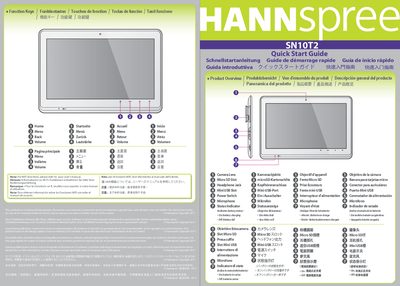
This Quick Start Guide introduces the Hannspree SN10T2 tablet, describing its function keys, camera lens, micro‑SD slot, headphone jack, and status indicator. It provides multilingual notes directing users to the full user manual for Wi‑Fi functions.
The guide also lists the required accessories such as the 5 V 2 A AC adapter (model NA0101WTC) and USB cable, and explains how to operate the power switch for turning on, suspending, and resuming the device.
| AC Adapter Output | 5 V 2 A (100‑240 V) |
|---|
Slide and hold the power switch for 2 seconds.
Slide the power switch to suspend; the power remains on.
Use the ADP 5 V 2 A (100‑240 V) adapter, model NA0101WTC.