
Key facts
- Brand
- Hannspree
- Model
- SN10T2
- Industry
- Electronics
- Documents
- 3
- Languages
- EN
- Last added
- 2012-05-02
Start here
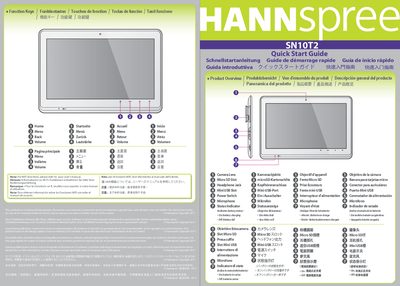
Hannspree SN10T2 Quick Start Guide
This Quick Start Guide introduces the Hannspree SN10T2 tablet, describing its function keys, camera lens, micro‑SD slot, headphone jack, and status indicator. It provides multilingual notes directing users to the full user manual for Wi‑Fi functions.
The guide also lists the required accessories such as the 5 V 2 A AC adapter (model NA0101WTC) and USB cable, and explains how to operate the power switch for turning on, suspending, and resuming the device.
Hannspree SN10T2 specifications
| Display size | 10.1" |
|---|---|
| Display resolution | 1024 x 600 |
| RAM | 512 MB LPDDR2, 200 MHz |
| Internal storage | 8 GB eMMC |
| Battery input | 5 V, 2 A, 10 W |
Source: Hannspree SN10T2 User Manual
All Hannspree SN10T2 documents by type
Day-to-day operation, settings and troubleshooting. Start here if the product is already set up.
The shortest path to a working setup, usually only a few pages.
Questions answered in these manuals
How do I power off the SN10T2?
Select the Power off option and confirm with OK; the device will shut down.
How much internal storage does the SN10T2 provide?
The tablet includes 8 GB of eMMC internal storage and supports a microSD card via the MicroUSB port.
How do I turn the device on?
Slide and hold the power switch for 2 seconds.
How can I suspend the tablet’s activities?
Slide the power switch to suspend; the power remains on.