
Key facts
- Manuals
- 20
- Models
- 1
- Categories
- 2
- Languages
- ZH · EN
- Last added
- 2012-05-02
Hannspree models by category
Featured Hannspree manuals

Hannspree HF205 LCD Monitor User Manual
This manual covers important safety information, FCC and EMC compliance, and environmental‑recycling policies for the Hannspree HF205 20‑inch TFT LCD monitor. It explains how to correctly connect power, video cables, and the monitor stand, and provides troubleshooting tips for common display issues.
The document also lists detailed technical specifications such as panel size, resolution, power consumption, supported input interfaces, and operating temperature ranges, helping users configure the monitor for optimal performance. This manual is written in Chinese.
Covers: 注意事項 · 液晶題示器特殊注意事項 · 使用前説明 · 特徴 · 検査包装的内容項目 · 安状読明
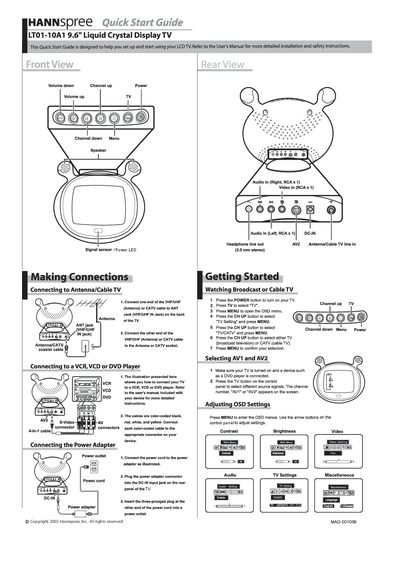
Hannspree LT01-10A1 LCD TV Quick Start Guide
This Quick Start Guide helps you set up and begin using the Hannspree LT01-10A1 9.6" LCD TV. It provides brief instructions for connecting antennas, cable, and external video sources, as well as basic operation of the remote control.
Key steps include connecting the VHF/UHF or CATV cable to the ANT jack, linking a VCR/VCD/DVD player with color‑coded cables, powering the unit, selecting TV or AV inputs, and adjusting OSD settings such as contrast and brightness using the arrow keys.
Covers: Getting Started · Making Connections · Connecting to Antenna/Cable TV · Connecting to VCR/VCD/DVD Player · Adjusting OSD Settings · Audio/Video Input Selection
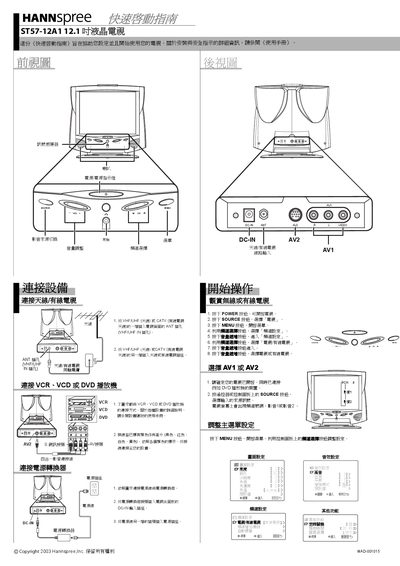
Hannspree ST57-12A1 Quick Start Guide
This Quick Start Guide helps you set up the Hannspree ST57-12A1 12.1" LCD TV safely and start using it quickly. It includes basic safety reminders and points you to the full User Manual for detailed instructions.
The guide walks you through connecting the antenna or cable TV input, attaching the power adapter, and using the remote control to turn the TV on, select sources, and adjust OSD settings.
Covers: Safety Instructions · Making Connections · Connecting to Antenna/Cable TV · Connecting the Power Adapter · Getting Started · Selecting AV1 or AV2
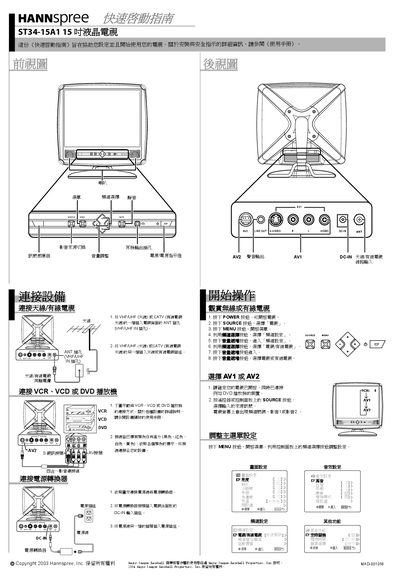
Hannspree ST34-15A1 Quick Start Guide
This Quick Start Guide helps you set up and start using the Hannspree ST34-15A1 15‑inch LCD TV. It provides essential instructions for connecting antennas, cable, and external devices, as well as powering the unit.
Key sections include making antenna/cable connections, attaching a VCR/VCD/DVD player, connecting the power adapter, selecting AV inputs, and adjusting on‑screen display settings using the remote control.
Covers: Getting Started · Making Connections · Connecting to Antenna/Cable TV · Connecting to VCR/VCD/DVD Player · Connecting the Power Adapter · Selecting AV1 or AV2
Latest Hannspree manuals
HANNSPREE SN10T2 Reference Manual
This document is a specification manual for Hannspree tablets. The tablet complies with the requirements of the Radio and Telecommunications Terminal Equipment Directive, as well as the Electromagnetic Compatibility Directive and the Low Voltage Directive. The tablet also meets the requirements of FCC Regulation 15 regarding wireless frequency interfaces. The document also provides instructions for setting up the tablet, information on its features and characteristics, as well as details about the panel and screen layout. Additionally, the document includes information on recycling the tablet.
HANNspree SN10T2 user manual
This manual introduces the features and characteristics of the tablet and describes how to set up, use, and maintain the tablet.
HANNspree SN12E2 series Manual
This manual introduces the use of HannsBook SN12E2 series notebook computers, including product features, instructions for use, precautions, etc.
HANNspree SN10E2 series Manual
This document is the user manual for HannsBook SN10E2 series, which introduces the features and precautions of this series of products.
HANNspree SB10T1 series Manual
This document introduces the use of tablets, including appearance, buttons, indicators, home screen, application, on-screen keyboard, Bluetooth, battery, use and cleaning tablets etc.
HANNspree SN10T2 Manual
This document is the quick start guide for Hannspree SN10T2, providing an overview of the main features and operation instructions of the product.
Hannspree HF205 LCD Monitor User Manual
User Manual 24 pages · 1.1 MB · ZHThe Hannspree HF205 LCD monitor user manual provides safety guidelines, installation steps, operation instructions, and technical specifications.
Hannspree LT01-10A1 LCD TV Quick Start Guide
Quick Start Guide 2 pages · 8.3 MB · ENQuick start guide for the Hannspree LT01-10A1 9.6" LCD TV, covering basic setup, connections, and OSD adjustments.
HANNspree LT35 Television quick Reference Manual
HANNspree K226-10H1 9.6" liquid crystal TV quick Reference Manual
HANNspree ST54-10A quick Reference Manual
HANNspree F629/F633/F637-10A1 quick Reference Manual
Hannspree ST57-12A1 Quick Start Guide
Quick Start Guide 2 pages · 8 MB · ENQuick Start Guide for the Hannspree ST57-12A1 LCD TV, showing how to connect antenna, power, and use basic functions.
HANNspree ST02-15A quick Reference Manual
HANNspree ST06-15A1 quick Reference Manual
Which document do I need?
User Manual
Day-to-day operation, settings and troubleshooting. Start here if the product is already set up.
Quick Start Guide
The shortest path to a working setup, usually only a few pages.
Questions answered in Hannspree manuals
What should I do if the backlight stops working?
Contact the manufacturer or an authorized service center for repair; do not attempt to open the unit yourself.
Which power supply voltages can be used with the monitor?
The monitor can be powered from 100‑240 V AC at 30‑60 Hz without any adjustment.
How do I connect the antenna or cable TV to the TV?
Connect one end of the VHF/UHF (Antenna) or CATV cable to the ANT jack on the back of the TV, and the other end to the antenna or CATV socket.
How do I turn the TV on?
Press the POWER button on the remote or TV panel to turn the TV on.
How do I connect the antenna or cable TV?
Connect one end of the VHF/UHF (Antenna) or CATV cable to the ANT jack on the back of the TV, and the other end to the antenna or CATV socket.
How do I turn on the TV and select the source?
Press the POWER button to turn on the TV, then press the SOURCE button to choose TV, AV1, AV2, or other inputs.