
This document introduces the use of Kodak Camera Dock 6000, including connecting the camera dock, installing the rechargeable battery, charging the battery, transferring pictures to the computer, printing, emailing, editing and organizing.
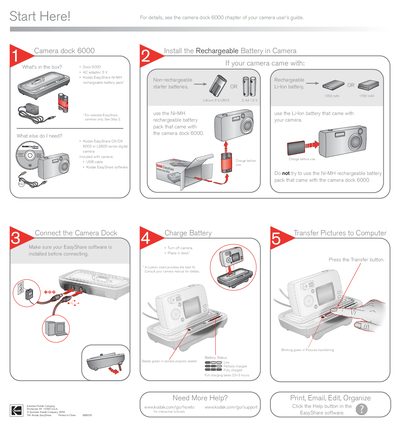
This manual guides you through unpacking the Kodak Camera Dock 6000, connecting it to your EasyShare camera, and installing the appropriate rechargeable battery. It also covers charging procedures, battery status indicators, and how to transfer images to a computer using the EasyShare software.
Additional sections provide troubleshooting tips, links to online support, and instructions for printing, emailing, or editing photos after transfer.
| AC adapter voltage | 5 V |
|---|---|
| Battery capacity (Ni‑MH) | 1050 mAh |
| Battery capacity (Li‑ion) | 1700 mAh |
| Full charge time | 2.5–3 hours |
Full charging takes about 2.5 to 3 hours.
Use the Ni‑MH rechargeable battery pack that comes with the dock, or the Li‑ion battery that came with your camera.
Press the Transfer button; a blinking green light indicates pictures are being transferred.