
This is a simple manual that introduces the basic functions and usage methods of the phone.
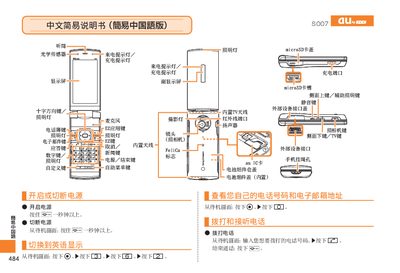
This manual explains how to operate the Sony Ericsson S007 mobile phone. It covers powering the device on and off, making and receiving calls, managing the contact list, and using the built‑in camera for photos and video recordings. The guide also describes how to set mute mode, record voice memos, and dial international numbers.
Each function is described with the required button presses shown on the screen, allowing users to quickly learn how to navigate the phone’s menus and adjust settings such as volume, lighting, and language options. This manual is written in Chinese.
From the standby screen, press the call key, enter the phone number, then press the call button again.
From the standby screen, hold the mute key for a few seconds; repeat to cancel mute mode.