
This document is a user guide for Philips mobile phones, which introduces the functions and operation methods of the phone. Philips strives to improve product performance but does not take responsibility for any errors or differences between the user guide and the product.
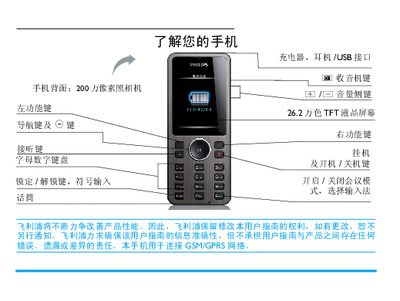
This manual provides step‑by‑step instructions for first‑time use of the Philips Xenium X320 mobile phone, including SIM card installation, battery charging, and basic navigation of menus and functions such as calls, messaging, camera, and media playback.
Additional sections cover advanced features like T9 input, Bluetooth pairing, power‑saving modes, and regulatory information such as SAR values and warranty terms, helping users get the most out of their device. This manual is written in Chinese.
| Camera resolution | 200 万像素 |
|---|---|
| Display | 26.2 万色 TFT LCD |
| Network | GSM / GPRS |
| SAR (Specific Absorption Rate) | 0.263 W/kg |
Remove the back cover, take out the battery, align the SIM with the notch outward and metal contacts down, push it into the slot, then re‑insert the battery and close the cover.
Connect the charger to the phone’s charging port and plug the charger into a power outlet; the battery icon will show a charging animation.
Long‑press the * key to toggle the T9 input method on or off.
The Xenium X320 has a SAR of 0.263 W/kg, complying with the GB21288‑2007 standard.