
The IP Phone LP-201 LAN Phone 201 is a full-featured desktop network phone suitable for office or home use. It features a stylish appearance, convenient function keys, and two network ports. It has a built-in PSTN port for using both network and regular landline calls simultaneously. It also supports standard SIP and H.323 protocols, providing high compatibility and cost-saving benefits for internet telephony.
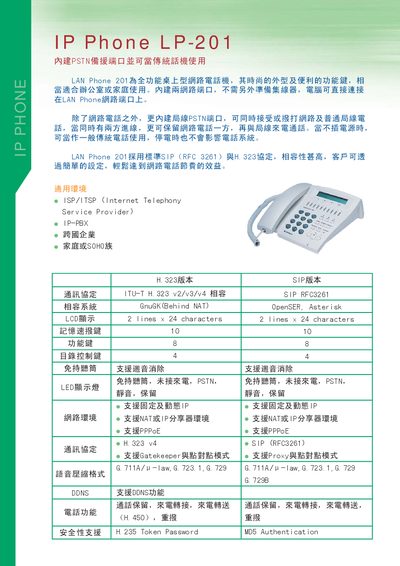
The LP-201 is a full‑feature desktop IP phone with a built‑in PSTN backup port, allowing it to function as a traditional telephone when needed. It includes two 10/100Base‑T Ethernet RJ‑45 ports, an LCD display, and a set of function keys for easy operation.
The manual covers configuration of SIP and H.323 protocols, security settings such as MD5 authentication and token passwords, and procedures for firmware upgrades via TFTP/FTP. Environmental specifications, power requirements, and physical dimensions are also provided. This manual is written in Chinese.
| Display | 2 lines x 24 characters |
|---|---|
| Keypad keys | 10 |
| Dimensions (W×H×D) | 215mm × 71mm × 198mm |
| Network ports | 2 × 10/100Base‑T Ethernet RJ‑45 |
| Operating temperature | 0°C to 40°C |
| Storage temperature | -20°C to 65°C |
| Operating humidity | 10% to 90% non‑condensing |
| Supported SIP protocol | RFC3261 |
| Supported H.323 versions | v2/v3/v4 |
The LP-201 provides two 10/100Base‑T Ethernet RJ‑45 ports.
Yes, it includes a built‑in PSTN port for backup and simultaneous use with the IP line.
It has a 2‑line by 24‑character LCD display.
Firmware can be upgraded via TFTP or FTP.