
This is a user manual that introduces the functions and usage of the watch.
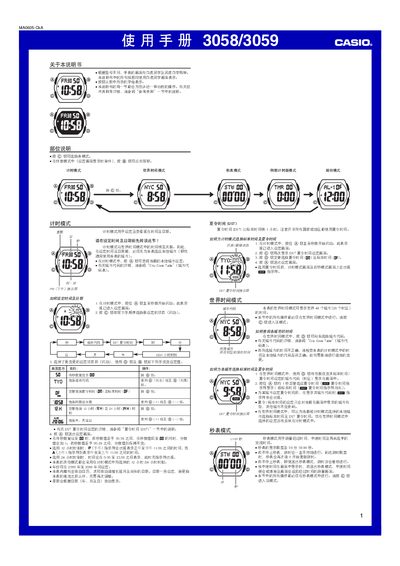
This manual provides step-by-step instructions for operating the Casio 3058/3059 digital watch. It covers setting time and date, world time, stopwatch, countdown timer, alarm functions, and lighting. Each section explains how to navigate and configure specific features using the watch’s buttons. The manual also includes notes on daylight saving time, city codes, and battery life considerations.
The watch features automatic calendar functions, 12/24-hour time formats, and five alarms including an intermittent alarm. It uses EL backlighting for visibility in dark conditions, which can be adjusted for duration. The manual includes detailed diagrams and button operation guides for each mode. This manual is written in Chinese.
| Time Format | 12-hour or 24-hour |
|---|---|
| Year Range | 2000 to 2099 |
| Calendar | Automatic |
| Alarm | 5 alarms (4 single-beep, 1 intermittent) |
| Stopwatch Limit | 59 minutes 59.99 seconds |
| Countdown Timer | 1 minute to 24 hours |
| Backlight | EL (electronic fluorescent) display |
Press and hold button A until the seconds start flashing to enter the setting mode. Then use button C to select the item to change, and buttons D and B to adjust the value.
Press and hold button A until the seconds flash to enter the setting mode. Press button C twice to access the DST setting screen. Use button D to toggle between DST and standard time.
In time mode, press and hold button A until the seconds flash. Press button B to toggle between 1.5 seconds and 3 seconds of backlight duration.
You can set five alarms: four single-beep alarms and one intermittent alarm that beeps every 5 minutes for 7 times.