
Key facts
- Brand
- Sampo
- Model
- S-512
- Category
- Telephone
- Industry
- Electronics
- Documents
- 2
- Languages
- ZH
- Last added
- 2012-02-07
Start here
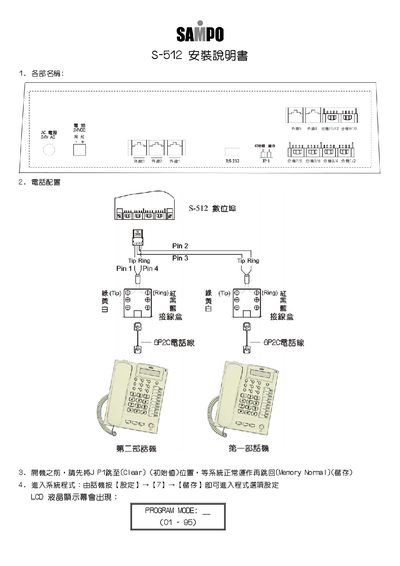
Sampo S-512 Installation Manual
This guide explains how to install and configure the Sampo S‑512 intercom system. It covers power connection, jumper settings, and initial system start‑up.
The manual details programming modes for extensions, door access passwords, time schedules, and other system parameters, providing the values and steps needed to complete a full installation. This manual is written in Chinese.
Sampo S-512 specifications
| External line receive volume steps | 0‑9 dB |
|---|---|
| External line transmit volume steps | 0‑9 dB |
| Door unit bell sound selection | 0‑9 (0=continuous, 1‑8=8 tones, 9=background music) |
All Sampo S-512 documents by type
Mounting, wiring and first power-up. Read it before the hardware goes in.
Questions answered in these manuals
How do I reset the system to its default values?
Set the JP1 jumper to the Clear (initial value) position before powering on, then after the system runs normally move it back to the Memory Normal position.
How can I set a door opening password?
Use the CODE mode to store a password value between 01 and 99.
How do I enter the system program on the S-512?
Press 【設定】→【7】→【循存】 on the telephone to access the program options.
How can I set the door lock activation time?
Use MODE:05-12-04 and store a value where 0=1 second, 1=2 seconds, up to 9=10 seconds.