
Sampo S-512 Installation Manual

This manual introduces the installation and configuration method of S-512 phone
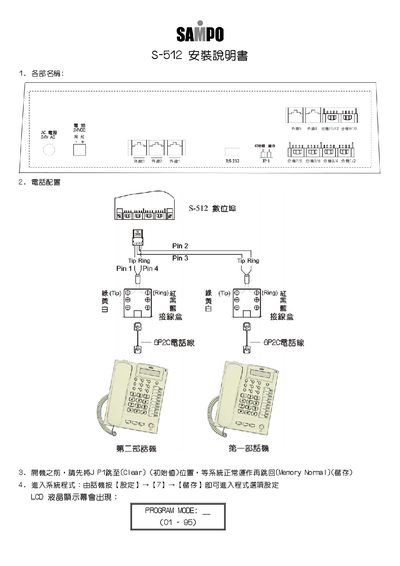

Sampo S-512 Installation Manual - cover page
Brand
Sampo
Category
Automation control Equipment
Document type
Installation Guide
Language
Chinese
Pages
6
File format
PDF
File size
225 KB
Published
07 February, 2012
Updated
30 September, 2023
Model
S-512
MD5 checksum
8A7CB9A442965DF56E33BFCF3F0D95D5

About this manual

This guide explains how to install and configure the Sampo S‑512 intercom system. It covers power connection, jumper settings, and initial system start‑up.

The manual details programming modes for extensions, door access passwords, time schedules, and other system parameters, providing the values and steps needed to complete a full installation. This manual is written in Chinese.

What's inside

  • Power Requirements
  • Connector Pinout
  • System Initialization
  • Program Mode Settings
  • Extension Configuration
  • Door Access Settings

Frequently asked questions

How do I reset the system to its default values?

Set the JP1 jumper to the Clear (initial value) position before powering on, then after the system runs normally move it back to the Memory Normal position.

How can I set a door opening password?

Use the CODE mode to store a password value between 01 and 99.

Download PDF (225 KB)

More Sampo Manuals


View all Sampo manuals →